

HAM SoilSense
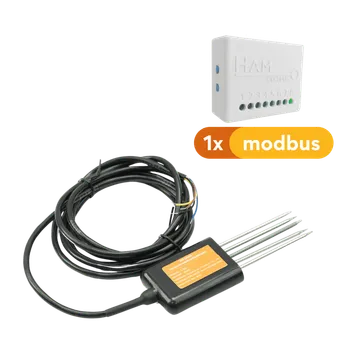
The HAM SoilSense measures the moisture, temperature and conductivity of the soil. It is for farmers, greenhouses, plant nurseries and gardens, to know when to water and when to fertilise.
The serial number starts with e31:. In the app the device shows as HAM SoilSenseS.
The device has the white HAM box and a soil probe on a cable. The shop has two versions:
- Temperature, humidity and conductivity.
- Temperature, humidity, conductivity and pH.
What it measures
Section titled “What it measures”| Reading | Unit | Note |
|---|---|---|
| Temperature | °C | The soil temperature. |
| Humidity | % | The soil moisture. |
| Electrical Conductivity | μS/cm | Shows how much salt and fertiliser the soil has. |
| Salinity | mg/L | |
| pH | Only with the probe that measures pH. |
Typical uses
Section titled “Typical uses”- Fields and orchards, to plan irrigation.
- Greenhouses and plant nurseries.
- Gardens and green areas.
Installation
Section titled “Installation”- Put the box at a point where the WiFi signal reaches.
- Put the probe into the soil, at the depth that you want to measure.
- Connect the device to WiFi from the mobile app. In the add-device wizard, select HAM Sense.
- Press and hold the setup button until the green LED blinks. See WiFi setup.
When the green LED stays on, the device is connected. See LED states.
Settings
Section titled “Settings”In Settings > Advanced:
- Probe Type: select the probe that you have. The options are Votesen, SEN0604 (T+H+EC+PH) and SEN0601 (T+H+EC). The default is SEN0601 (T+H+EC).
- Calibration table: a field correction for temperature, conductivity, humidity, salinity and pH. Press Calibrate to fill it in.
The general settings of all devices are in device settings.
Recommended rules
Section titled “Recommended rules”The Recommended setups button on the device page suggests:
- An alert when the temperature goes out of range.
- An alert when the humidity goes out of range.
- An alert when the device stops sending data.
The humidity alert tells you when the soil gets dry. See Your first alert.
Troubleshooting
Section titled “Troubleshooting”- No pH reading: check that your probe measures pH and that the Probe Type is SEN0604 (T+H+EC+PH).
- Wrong values: check that the Probe Type is correct. See wrong values.
- The device is offline: check the WiFi signal at the site. See device offline.
Specifications
Section titled “Specifications”| Connectivity | WiFi 2.4 GHz |
| Probe | Modbus soil probe, on a cable |
| Marks | CE, WEEE, RoHS |
To buy, see the shop.