

HAM FlowSense
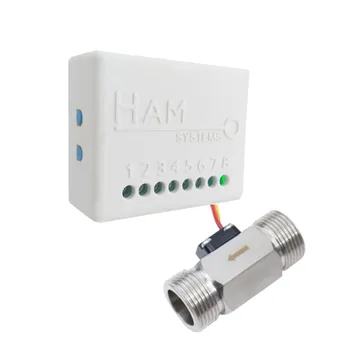
The HAM FlowSense measures how much liquid goes through a pipe and how fast. Use it when you want to see water consumption and know at once about leaks or sudden changes. It works with a flow sensor that sends pulses, for water and also for other liquids such as oil or milk.
The serial number starts with e28: (HAM FlowSenseS). The older version starts with 28:.
What it measures
Section titled “What it measures”| Reading | Unit | Note |
|---|---|---|
| Liquid | L | Total quantity that went through |
| Liquid flow rate | L/min | Current flow |
| Liquid (Daily), (Weekly), (Monthly), (Since ref.) | L | Consumption per period. Only on the older version (28:) |
| Gen. In., Gen. In. 2 | Two general inputs. They show when you configure them |
For consumption per day, week or month, see also Charts and Reports.
Typical uses
Section titled “Typical uses”- Water consumption in businesses, hotels and homes.
- Detection of leaks and unusual consumption.
- Flow measurement of other liquids, such as oil or milk.
Installation
Section titled “Installation”The device connects to WiFi 2.4 GHz. You set it up from the HAM app, as described in Connect a device to WiFi.
- The flow sensor goes into the pipe. Any professional plumber can install it.
- Select a sensor with the same thread as your pipe: G1/2”, G3/4” or G1”.
- Do not install the sensor where frost can occur.
For general installation guidance see Sensor placement and wiring.
Install a filter at the inlet of the sensor. This keeps particles and debris out of the sensor.
The terminal order is different between versions of the device. Connect the sensor as the manual of your device shows.
Settings
Section titled “Settings”The settings are on the device page, in the Settings section. For the general procedure see Device settings.
- Pulses per Litre (in Advanced): how many pulses the sensor sends for each litre. HAM sets the value for the sensor that it supplies. Change it only if you connect a different meter.
- Device Description: text that shows as a subheading in reports.
- General input is alarm output (in Advanced): the last general input becomes an alarm output.
- Alarm buzzer mode (in Advanced,
e28:only): the device sounds while an alarm is active. - Allow LAN commands (in Advanced): other devices on your local network can control this device. Keep the setting off if you do not need it.
- Force IPv4 (in Advanced,
e28:only): the device uses only IPv4 connections. - Do not keep track of data (in Advanced): the app keeps no reading history.
Connect to an alarm system
Section titled “Connect to an alarm system”The device can give a 3.3 VDC output (maximum 10 mA) while an alarm is active. This output can drive a dry contact relay, for example to an alarm panel. Do not connect a load directly to the output.
Recommended rules
Section titled “Recommended rules”The app has no ready-made rules for this device. Create at least these:
- An alert when Liquid flow rate stays above 0 for a long time, for example at night. This shows a leak.
- An alert when Liquid flow rate goes above a limit.
- An alert when the device goes offline. See Offline alerts.
For the steps see Create a rule.
Troubleshooting
Section titled “Troubleshooting”| What you see | Possible cause | What to do |
|---|---|---|
| The flow stays at 0 while water runs | A problem in the sensor wiring | Check the sensor cables |
| The quantity is much too high or too low | Wrong Pulses per Litre | Contact us for the correct value |
| The reading is not accurate at very low flow | The flow is below the sensor range | The accuracy applies to 2-30 L/min |
For general problems see Wrong or strange values and Device shows offline.
Specifications
Section titled “Specifications”| Sensor | Hall effect flow sensor, thread G1/2”, G3/4” or G1” |
| Flow range | 1-30 L/min |
| Accuracy | ±5% (2-30 L/min) |
| Maximum pressure | 1.75 MPa |
| Operating conditions | No frost |
| Alarm output | 3.3 VDC, maximum 10 mA |
| Power | Micro-USB adapter (included) or 5-12 VDC via terminals |
| Connectivity | WiFi 802.11 b/g/n, 2.4 GHz |
| Device operating temperature | -10 to 55 °C (5 V), -10 to 40 °C (12 V), 5-90% RH |
| Enclosure dimensions | 55 x 44.1 x 21.5 mm |
Available in the shop.