

GPS trackers
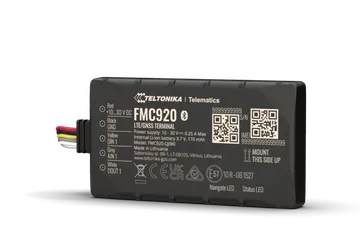
GPS trackers show where a vehicle is, how fast it moves and where it stopped. Use them for vehicle fleets, trucks, vans, machines and equipment. They connect to the internet over the 4G mobile network, with a SIM card. They do not need WiFi.
The serial number starts with t and the family number, for example t2:.
Models
Section titled “Models”| Model | Description |
|---|---|
| FMC920 | Compact 4G LTE Cat 1 tracker, for basic fleet tracking. |
| FMC880 | Water-resistant 4G tracker with high GPS precision. |
| FMC230 | Water-resistant 4G tracker, with an input for a temperature probe. |
Families
Section titled “Families”The app puts the trackers into families. The family depends on the configuration and the sensors that you bought.
| Serial | Name in the app | What it adds |
|---|---|---|
t2: |
Telt GPS | Position, speed, distance and ignition only. |
t1: |
Telt GPS+T | Temperature from up to 2 probes, and humidity. |
t3: |
Telt GPS+EYE | Temperature and humidity from an EYE sensor over Bluetooth. |
t4: |
Telt GPS+BLE+GI | Temperature and humidity over Bluetooth, and 4 general inputs. |
t6: |
Telt GPS+BLE+GI+DOUT | As t4, and 2 outputs that you control from the app. |
t5: |
Telt GPS+OBD | Engine data from the OBD-II port. See GPS with OBD-II. |
For the families with temperature, see GPS with temperature.
What it measures
Section titled “What it measures”All trackers give:
| Reading | Unit | Note |
|---|---|---|
| Latitude, Longitude | degrees | The position of the vehicle. |
| Speed | km/h | |
| Distance Traveled | m | |
| Angle | ° | The direction of travel. |
| Ignition | on / off | See the caution below. |
| Battery Voltage | V | |
| Last move at | time | The last time the position changed. |
Typical uses
Section titled “Typical uses”- Fleets of company vehicles.
- Delivery trucks and vans.
- Construction machines and equipment that moves.
SIM and subscription
Section titled “SIM and subscription”The tracker has a built-in SIM card with mobile data. Usually it comes with data for 6 or 12 months. Before the period ends, renew it with a SIM product from the shop. If you do not renew it, the tracker stops sending data. Its history stays in your account.
See subscriptions.
Installation
Section titled “Installation”The tracker needs no WiFi setup. It needs only power and a claim.
- Connect the red wire to the positive (+) terminal of the vehicle battery.
- Connect the black wire to ground.
- Install the tracker with the “Mount this side up” side up, for a better signal.
- Claim it to your account with the Device key.
The tracker has two LEDs: Navigate for GPS and Status for power and operation. When both blink about once per second, the installation is correct.
The colours and pins come from the Teltonika drawings.
| Connection | FMC920 | FMC880 | FMC230 |
|---|---|---|---|
| Power (+) | Red | Red | Pin 1, red |
| Ground (-) | Black | Black | Pin 7, black |
| Digital input DIN1 | Yellow | None | Pin 5, yellow |
| Analog input AIN1 | Grey | None | Pin 4, shared with DIN2 |
| Digital output DOUT1 | White | None | Pin 8 |
| Other inputs and outputs | None | None | DIN3/AIN2, DOUT2, DOUT3, 1-Wire |
The FMC920 has 5 wires. On the FMC920, the yellow wire is a digital input for a dry contact. The platform does not use the grey and white wires.
The FMC880 has only 2 wires. They connect directly to the terminals of the vehicle battery.
The FMC230 has a 12-pin connector (2 rows of 6).
Map and route
Section titled “Map and route”- On the device page, the Map item shows the route of the vehicle.
- The route shows for a period of up to 7 days. For a longer period the app shows “Select a shorter range to see the route”.
- The map page shows all vehicles. When you select a vehicle, it shows the route and the stops of the last 24 hours and follows its live position.
- The Stops report shows where the vehicle stopped. A stop is when the vehicle stays still for more than 120 seconds.
Settings
Section titled “Settings”- Ignition filter: while the ignition is off, the GPS position does not change and the speed is zero.
- Show map: shows the position on a map.
- Include in summary views: the tracker shows in the summary views.
- Device Description: text that shows as a subheading in reports.
Controls
Section titled “Controls”The t6 family has 2 outputs, DOUT1 and DOUT2. You turn them on and off from the app or with a rule.
See controls.
There are no ready recommended rules for trackers without temperature. The Location (geofence) condition checks if the vehicle is inside or outside an area on the map. The minimum radius is 50 m. See rule conditions and create a rule.
Troubleshooting
Section titled “Troubleshooting”- The tracker is offline: the vehicle is at a place with no mobile signal, or the SIM data ended, or the vehicle power is cut.
- The position does not change: check the Ignition filter and Ignition.
- The route does not show: select a period of up to 7 days.
- For general problems, see device offline.
Specifications
Section titled “Specifications”All models connect to the 4G mobile network, with a built-in SIM.
| Item | FMC920 | FMC880 | FMC230 |
|---|---|---|---|
| Power | 10-30 VDC | 10-30 VDC | 10-30 VDC |
| External fuse on the power wire | 3 A, 125 V | Teltonika does not ask for one. The tracker has an internal 3 A fuse. | 3 A, 125 V |
| Internal battery | Li-ion 3.7 V, 170 mAh | Li-ion 3.7 V, 170 mAh | Li-ion 3.7 V, 170 mAh |
| Protection | IP54 | IP65 | IP67 |
| Operating temperature | -20 to +40 °C | 0 to +40 °C | -20 to +40 °C |
| Battery charge temperature | 0 to +45 °C | 0 to +45 °C | 0 to +45 °C |
The operating temperature is for the tracker with its internal battery connected.