

HAM GasSense
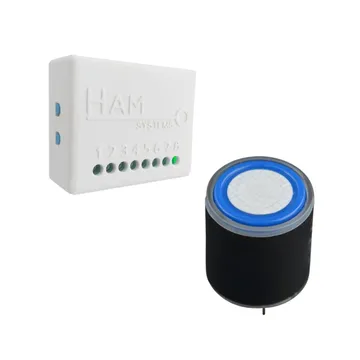
The HAM GasSense measures the concentration of one gas in the air and alerts you when it goes past a limit. It is for warehouses, refrigeration machine rooms, workshops, battery rooms and industrial sites.
The serial number starts with e15:.
Each device measures one gas. You select the gas when you buy the device. The shop has versions for:
| Gas | Symbol |
|---|---|
| Ammonia | NH3 |
| Oxygen | O2 |
| Carbon monoxide | CO |
| Hydrogen sulphide | H2S |
| Chlorine | CL2 |
| Sulphur dioxide | SO2 |
| Nitrogen dioxide | NO2 |
| Ozone | O3 |
| Hydrogen | H2 |
| Hydrogen chloride | HCL |
| Hydrogen fluoride | HF |
| Phosphine | PH3 |
What it measures
Section titled “What it measures”| Reading | Unit | Note |
|---|---|---|
| Gas Concentration | ppm | The gas of the version that you bought. |
| General input 1, 2 | open / closed | Shows when you set up the input. |
| Input counter 1, 2 | count | Counts the changes of the input. |
The app shows the general input as Gen. In. until you give it a name.
Typical uses
Section titled “Typical uses”- Refrigeration machine rooms with ammonia (NH3).
- Rooms with boilers or engines, for carbon monoxide (CO).
- Battery charging rooms, for hydrogen (H2).
- Closed spaces with a risk of low oxygen (O2).
- Swimming pools and water treatment, for chlorine (CL2).
Installation
Section titled “Installation”Connect the device to WiFi from the mobile app. See WiFi setup.
For the position of the device in the room, contact us. The correct position depends on the gas. See contact support.
Settings
Section titled “Settings”In Settings > Advanced:
- Alarm buzzer mode: the device sounds when there is an active alarm. It is on by default.
- General input is alarm output: the last general input becomes an alarm output. A rule with the action Alarm output turns it on. With a relay module you can send a signal to an alarm system or a fan.
- Calibration table: a field correction for the gas concentration. Press Calibrate to fill it in.
The general settings of all devices are in device settings.
Recommended rules
Section titled “Recommended rules”The app does not suggest ready rules for this device. Make two rules:
- An alert when the Gas Concentration goes above the limit for your site. For oxygen, an alert when it goes below the limit.
- An alert when the device stops sending data.
See Create a rule and offline alerts.
Troubleshooting
Section titled “Troubleshooting”- The device is offline: see device offline.
Specifications
Section titled “Specifications”| Connectivity | WiFi 2.4 GHz |
| General inputs | 2 |
| Marks | CE, WEEE, RoHS |
To buy, see the shop.