

HAM Bluetooth Card Switch
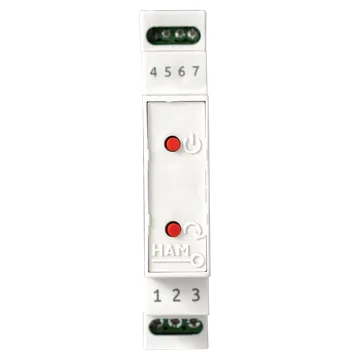
The HAM Bluetooth Card Switch turns on the room power when the guest is inside and turns it off when the guest leaves. Use it in hotels, villas, Airbnb properties and short-term rentals.
The system has two parts:
- a HAM DinSwitchM in the electrical panel of the room,
- a small HAM BLE Tag on the room keychain.
You do not need a card holder on the wall or new wiring in the room.
The serial number of the DinSwitchM starts with e2:.
How it works
Section titled “How it works”- The guest enters the room with the key.
- The DinSwitchM hears the tag and turns on the power.
- The guest leaves and takes the key.
- The DinSwitchM waits for the delay time and then turns off the power.
The tag decides. While the tag is in the room, the power stays on. If you turn off the device from the app while the tag is inside, the device turns on again.
Typical uses
Section titled “Typical uses”- Hotel rooms.
- Villas and short-term rental apartments.
- Any space where the power must go off when nobody is inside.
Installation
Section titled “Installation”- An electrician installs the DinSwitchM on a DIN rail in the room panel.
- Connect the DinSwitchM to WiFi from the mobile app. See connect to WiFi.
- Claim each tag to your account with the Device Key on its label. See claim a device.
- Open the page of the tag. The MAC address is in the Firmware section.
- Write the MAC address of each tag in a BLE Tag MAC field, in the Advanced settings of the DinSwitchM.
- Enable the BLE Tag monitor setting.
The shop sells the system with or without energy metering.
Settings
Section titled “Settings”- BLE Tag monitor: the device turns off when it hears no tag and turns on when it hears a tag again. While it is on, tag presence overrides remote control.
- BLE Tag absence delay: how many seconds the device waits without a tag before it turns off. The default is 180 seconds.
- BLE Tag MAC: the MAC address of one tag, in the format
aa:bb:cc:dd:ee:ff. You can enter up to 8 tags.
The general settings of all devices are in device settings.
Troubleshooting
Section titled “Troubleshooting”- The power turns on again after you turn it off: the tag is in the room. This is the correct operation. For remote control, disable BLE Tag monitor.
- The power goes off while the guest is inside: make sure that the tag MAC address in the settings is correct. Check the tag battery.
- The power goes off too late: decrease the BLE Tag absence delay.
- The device is offline: see device offline.
Specifications
Section titled “Specifications”| Item | Value |
|---|---|
| Connectivity | WiFi 2.4 GHz and Bluetooth LE |
| Mounting | DIN rail in the electrical panel |
| Tags per device | Up to 8 |