

HAM ThermoSense
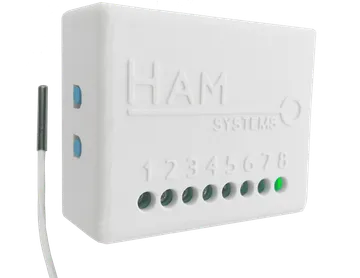
The HAM ThermoSense is the original HAM temperature logger. It logs the temperature of a fridge or a room and the state of a door.
What it measures
Section titled “What it measures”| Reading | Unit | Note |
|---|---|---|
| Temperature | °C | From the probe on the cable. |
| General input 1, 2 | open / closed | For a magnetic door contact. Shows when you configure the input. |
| Input counter 1, 2 | count | Counts the changes of the input. Shows when it has counted something. |
Typical uses
Section titled “Typical uses”- Fridges, freezers and cold rooms.
- Door monitoring with a magnetic contact.
- Temperature records for HACCP.
HAM loggers are used for HACCP temperature records. Each reading has a date and time and stays in your account. You can export reports for the inspection.
Installation
Section titled “Installation”- Put the white box outside the cold area. Attach it with double-sided tape.
- Put the probe through the door gasket or through a special opening. Ask your refrigeration technician about the opening.
- Connect the USB power supply.
- Connect the device to WiFi from the mobile app. Press and hold the setup button until the green LED blinks. See Connect to WiFi.
When the device is connected, the green LED stays on. See LED states.
Do not put the probe near the door, in front of the fan, near the lamp, or against walls and products.
Terminals
Section titled “Terminals”- Connect the probe to terminals 1 and 2 (P1, same colour) and 3 (P2).
- The general inputs are terminals 6 (G1) and 7 (G2). The common terminal is 8 (GND).
- To power the device without USB, connect 5-12 V DC to terminals 5 (V+) and 8 (GND).
HAM ThermoSense setup on YouTube. The video shows an older version of the app.
Settings
Section titled “Settings”- Calibration table (in Advanced): field correction, up to 6 points. It is not a laboratory certificate.
- General input is alarm output: the last general input becomes an alarm output. With a relay module you can give a signal to an alarm system.
Recommended rules
Section titled “Recommended rules”Make an alert for temperature out of range and an alert when the device stops sending data. See Your first alert and offline alerts.
Troubleshooting
Section titled “Troubleshooting”- The door contact always shows open: the labels can be inverted, or the magnet is too far away.
- The temperature is a few degrees off: see wrong values.
- The device is offline: see device offline.
Specifications
Section titled “Specifications”| Power | USB cable (included) or 5-12 V DC on terminals 5 (V+) and 8 (GND) (connection by a technician) |
| General inputs | 2, for magnetic contacts |
| Connectivity | WiFi 2.4 GHz |
| Sensor | PT100, on terminals 1, 2 and 3 |
| Dimensions | 55 x 44.1 x 21.5 mm |
| Material | ABS |