

HAM PoolSense
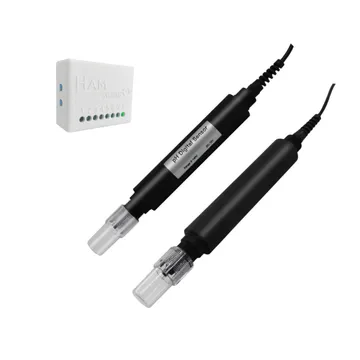
The HAM PoolSense monitors the water quality of a pool. It measures pH, ORP and temperature, and calculates free chlorine. It is for private pools, hotels, spas and commercial facilities.
The serial number starts with e35: or e5:. Only e5: devices have outputs for dosing pumps.
What it measures
Section titled “What it measures”| Reading | Unit | Note |
|---|---|---|
| pH | 0-14 | |
| ORP | mV | Oxidation-reduction potential. It shows how well the water is disinfected |
| Free Chlorine | ppm | Calculated from pH and ORP. It is not a direct measurement |
| Temperature | °C | Water temperature |
Typical uses
Section titled “Typical uses”- Private pools.
- Pools in hotels and commercial facilities.
- Spas.
Installation
Section titled “Installation”The device connects to WiFi 2.4 GHz. You set it up from the HAM app, as described in Connect a device to WiFi.
- The sensors go into the water (IP68).
- The device gets 12 VDC power via terminals.
- Put the device in a dry place, for example in the pool plant room.
For installation in an existing pool circuit, contact us.
Settings
Section titled “Settings”The settings are on the device page, in the Settings section. For the general procedure see Device settings.
- Calibration table (in Advanced): field correction. There is a table for temperature, pH and ORP. Tap Calibrate to fill it in.
- Include in summary views: the device shows in the summary views on the home page.
- Allow LAN commands (in Advanced): other devices on your local network can control this device. Keep the setting off if you do not need it.
- Force IPv4 (in Advanced): the device uses only IPv4 connections.
- Do not keep track of data (in Advanced): the app keeps no reading history.
Calibration
Section titled “Calibration”The pH and ORP sensors wear with time. If the values change slowly for no reason, calibrate them.
- On the Calibration table row of the reading, tap Calibrate.
- Read the warning and accept it.
- Put the sensor in a solution with a known value.
- On a table row, tap Use current.
- In the Reference column, type the known value of the solution.
- Tap Submit.
Controls
Section titled “Controls”The e5: devices have three outputs for dosing pumps:
| Output | Use |
|---|---|
| PH+ | Pump to increase pH |
| PH- | Pump to decrease pH |
| ORP+ | Pump to increase ORP |
Each output is a switch on the device page. You can turn it on or off from the app, or automatically with a rule. See Control outputs.
The e35: devices have no outputs. They only measure.
Recommended rules
Section titled “Recommended rules”The Recommended setups button in the Notifications and Automation section of the device page suggests:
- An alert when the temperature goes out of range.
- An alert when the device stops sending data for 15 minutes.
Also create rules for pH and ORP out of range. See Your first alert and Offline alerts.
Troubleshooting
Section titled “Troubleshooting”| What you see | Possible cause | What to do |
|---|---|---|
| pH or ORP changes slowly for no reason | The sensor is worn or needs calibration | Calibrate. If this does not correct it, replace the sensor |
| Free chlorine is different from the test kit | It is a value calculated from pH and ORP | Calibrate pH and ORP |
For general problems see Wrong or strange values and Device shows offline.
Specifications
Section titled “Specifications”| pH range | 0-14 |
| ORP range | -1999 to +1999 mV |
| Accuracy | ±0.02 pH, ±1 mV |
| Stability | ≤0.01 pH/24h, ≤2 mV/24h |
| Sensor operating temperature | 0 to 60 °C |
| Sensor protection | IP68 |
| Device operating temperature | -10 to 50 °C |
| Device dimensions | 55 x 44.1 x 21.5 mm |
| Power | 12 VDC via terminals |
| Connectivity | WiFi 802.11 b/g/n, 2.4 GHz |
See the shop for availability. To measure only pH, see HAM pHSense.