

HAM ECSense
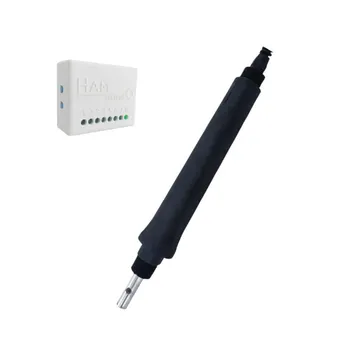
The HAM ECSense measures the electrical conductivity (EC) of water and calculates total dissolved solids (TDS) and hardness. It is for hydroponic growers who want to check the concentration of the nutrient solution.
The serial number starts with e34:.
What it measures
Section titled “What it measures”| Reading | Unit | Note |
|---|---|---|
| Electrical Conductivity | μS/cm | EC |
| Total Dissolved Solids | ppm | TDS. Calculated from the conductivity with the TDS Factor |
| Water Hardness | °d | German degrees |
| Temperature | °C | Water temperature |
Typical uses
Section titled “Typical uses”- Nutrient solutions in hydroponics.
- Water quality checks.
Installation
Section titled “Installation”The device connects to WiFi 2.4 GHz. You set it up from the HAM app, as described in Connect a device to WiFi.
- The sensor has a G3/4 thread and goes into the water (IP68). Its cable is 2 m long.
- Select the sensor measuring range for your water: 0-20, 0-200, 0-2000 or 0-20000 μS/cm.
- Put the device in a dry place.
Settings
Section titled “Settings”The settings are on the device page, in the Settings section. For the general procedure see Device settings.
- TDS Factor: the conversion factor from conductivity to TDS. The default is 500. Usual values are 500, 640 or 700.
- Calibration table (in Advanced): field correction for conductivity and temperature. Tap Calibrate to fill it in. The steps are the same as for the HAM PoolSense.
- Include in summary views: the device shows in the summary views on the home page.
- Allow LAN commands (in Advanced): other devices on your local network can control this device. Keep the setting off if you do not need it.
- Force IPv4 (in Advanced): the device uses only IPv4 connections.
- Do not keep track of data (in Advanced): the app keeps no reading history.
Recommended rules
Section titled “Recommended rules”The app has no ready-made rules for this device. Create an alert when Electrical Conductivity goes out of range and an alert when the device goes offline. See Create a rule and Offline alerts.
Troubleshooting
Section titled “Troubleshooting”| What you see | Possible cause | What to do |
|---|---|---|
| Conductivity changes slowly for no reason | The sensor is worn or needs calibration | Calibrate. If this does not correct it, replace the sensor |
| TDS is different from another instrument | A different TDS Factor | Set the same factor as the other instrument |
For general problems see Wrong or strange values and Device shows offline.
Specifications
Section titled “Specifications”| Measuring range | 0-20, 0-200, 0-2000 or 0-20000 μS/cm (depends on the sensor) |
| Accuracy | ±2% FS, ±0.5 °C |
| Sensor operating temperature | 0 to 60 °C |
| Sensor thread | G3/4 |
| Sensor protection | IP68 |
| Cable length | 2 m |
| Device operating temperature | -10 to 50 °C |
| Device dimensions | 55 x 44.1 x 21.5 mm |
| Power | 12 VDC |
| Connectivity | WiFi 802.11 b/g/n, 2.4 GHz |
See the shop for availability.